1. Introduction Section (Top of Infographic)
Header:
“Linux: The Open-Source Power Behind Modern Computing”
Visual Ideas:
- Illustration of the Linux penguin (Tux) surrounded by icons for servers, desktops, IoT, and cloud.
- A clean circular graphic showing the open-source ecosystem.
Text (brief):
Linux is a free, open-source operating system kernel that powers everything from smartphones and servers to supercomputers.
With hundreds of distributions (“distros”), Linux offers flexibility, security, and performance for every need.
2. Core Structure of Linux (Small Diagram Section)
Visual: Layered diagram showing:
- Kernel
- Shell
- Applications
Text (minimal):
Every Linux system shares a common foundation: the Linux kernel, command-line shell, and user applications.
3. Types of Linux Distributions (Main Comparative Section)
| Category | Example Distros | Key Features | Ideal For |
|---|---|---|---|
| 🖥️ Desktop | Ubuntu, Linux Mint, Fedora | User-friendly, easy installation, large community | Everyday users, students |
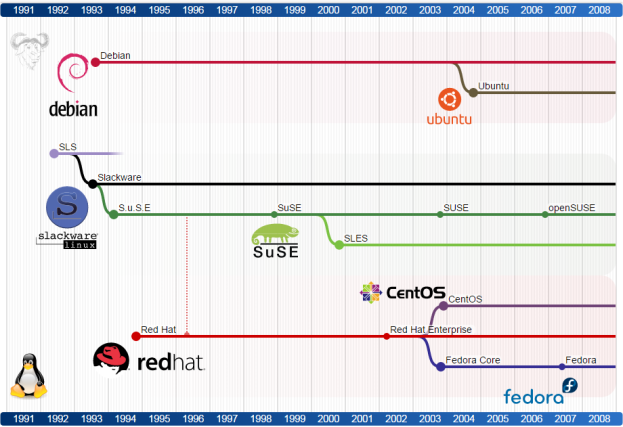
| 🧰 Developer / Power User | Arch Linux, Manjaro, openSUSE | Customizable, cutting-edge, flexible package management | Developers, Linux enthusiasts |
| 🛠️ Server | CentOS Stream, Debian, Ubuntu Server | Stable, secure, optimized for uptime | Web & database servers |
| 💻 Lightweight / Old Hardware | Lubuntu, Puppy Linux, Xubuntu | Low system requirements, fast boot | Older PCs, low-memory systems |
| ☁️ Cloud / Enterprise | Red Hat Enterprise Linux (RHEL), SUSE Linux Enterprise | Enterprise support, scalability | Businesses, cloud infrastructure |
| 🔒 Privacy / Security Focused | Tails, Qubes OS, Kali Linux | Anonymity, ethical hacking tools, sandboxing | Cybersecurity professionals |
Visual Design Tips:
- Use icons for each distro category (desktop, server, security, etc.).
- Include distro logos (Ubuntu, Fedora, Arch, Debian, etc.) next to names.
- Use color coding per category for clarity.
4. Fun Facts & Statistics Section
Visual: Infographic elements like percentage circles or icons.
Facts (examples):
- 🧩 Over 95% of the world’s top 1 million servers run on Linux.
- 📱 Android, the world’s most popular mobile OS, is based on the Linux kernel.
- 🛰️ Linux runs on 100% of the top 500 supercomputers (Top500.org, 2025).
- 🚀 Even the International Space Station uses Linux!
5. Advantages of Linux (Icon Grid)
Icons + short text:
- 🔓 Open Source: Free and transparent.
- 🧱 Security: Minimal malware risk.
- ⚡ Performance: Efficient use of resources.
- 🔄 Customizable: Tailor it to your workflow.
- 🌍 Community Support: Global collaboration.
6. Visual Summary / Flow Diagram
Idea:
Flowchart showing how Linux connects across domains:
Desktop 💻 → Server 🖥️ → Cloud ☁️ → IoT 🔌 → Supercomputers 🚀
Include logos or simplified silhouettes to make it visually engaging.
7. Design & Creativity Tips (for building your infographic)
- Color Palette: Use a dark background (black/navy) with bright accent colors (green, orange, blue).
- Font Choice: Clean sans-serif fonts (e.g., Open Sans, Roboto).
- Layout: Use a vertical flow — top (intro) → middle (comparison) → bottom (stats/conclusion).
- Icons: Use flat vector icons for distro logos and hardware symbols.
- Software Tools: Canva, Figma, or Adobe Illustrator (for professional polish).
8. Footer Section
Include your name/team, sources, and date:
Sources: DistroWatch, Linux Foundation, Red Hat, Ubuntu Docs (2025)
Created by [Your Name / Team Name]